So completing my year's worth of hardware reviews, I now review the console that starts the 8th generation of home console gaming, the Wii U. Announced last year as the successor to the Wii and then later revealed to be more than just a new console, could this be Nintendo's best console to date? Let's find out:
The Box and It's Contents

Now as I'm a very experienced and hardcore gamer, the premium pack was the obvious choice for me. It's got some nice blue and black colours all over and has the console on one of it's big sides and the U logo on the other. It also points out that the console has 32GB in hard drive and contains the game, Nintendoland (which I plan to review at a later date) which is the game that shows off what the console can do (much like Wii Sports did with the Wii). Inside the box, Nintendo have done a tray system, much like the Wii, with all the manuals and wired stuff in one tray and the console and Wii U Gamepad in the other. Unlike the basic pack, this pack contains stands for the console and Gamepad, a charging dock for the Gamepad, Nintendoland and a Nintendo Network Premium Subscription in addition to the console, Gamepad, HDMI Cable, sensor bar and the usual power supply plug for the console and a charging plug for the Gamepad. So far, it's packaged well and overall, a very good start. 9/10
Console and Gamepad Design

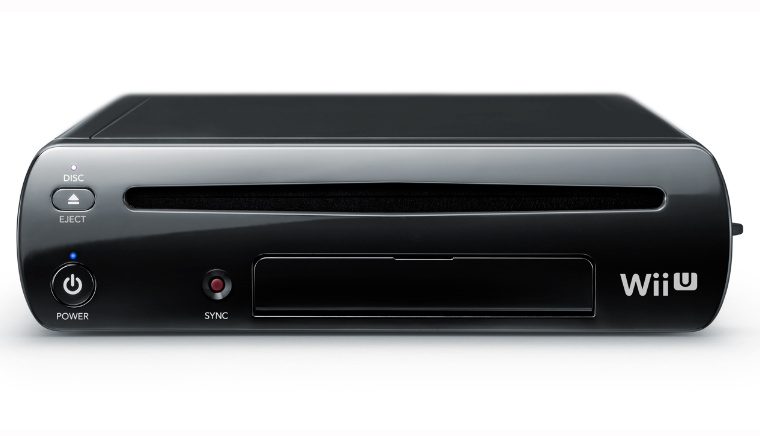
The console looks near enough identical to the original Wii. The only differences here are that it has a more curved finish making it look more smoother and professional. It also has 4 USB ports (2 on the back and 2 on the front, under the panel) which even though is better than Wii, a lot of us will be disappointed with it having USB 2.0 and not 3.0 ports. It has a SD card slot as well on the front. It also has the sync button which is used to connect the Wii U Gamepad, Wii Remotes and Wii Balance Board (by the way, only Wii Remote Plus and Wii Remotes with Wii Motion Plus connected, will work with this console). The power and eject buttons look much bigger and better than those rectangle buttons on the Wii and both have lights (the power on and off light and a white light for the eject button which tells you that a disc is in the console). On the back, all the ports that you would expect including HDMI, the power port, the sensor bar port and surprisingly a AV port. So that's the console, but what about the Gamepad? The Gamepad has all the usual Nintendo controller buttons (A, B, X, Y, L, R, ZL, ZR, Start, Select, Home, D-Pad, Thumb sticks and the power on and off button) with the addition of a TV button which can work as a TV remote which works well for my TV (which is a 32 inch, HD Panasonic VIERA). The screen is big and has what could be the best graphics I've seen for a device like that (could even surpass the PS Vita's one). The touchiness of the screen is as with all touchscreens made by Nintendo, is OK, not great, just OK. Underneath the GamePad is what I assume to be where you connect it to a charging plug/dock. The Gamepad's features that were announced (Gyroscope, Accelerometer, Camera, Microphone, built-in sensor bar etc) all work incredibly well and the Stylus looks to be the exact same shape and form to that of the 3DS XL. Overall, the console and Gamepad, look good and holding the gamepad in your hands, work quite well (but there will be times where your hands will start to ache when using the stylus with one hand and holding the gamepad in the other). 8/10
Setup
The setup of the console is incredibly simple and you only have to look at the GamePad to do most of it, so that's a plus if you want to save electricity. All you would need to do is set up the TV settings, Date and Time, the Gamepad's TV remote functions and the Internet connection. As you would expect, there will be a system update needed for the console as soon as you connect to the Internet which gives you access to all of the console's online features which I'll get to in a bit. It's likely to take more than an hour to do so I would do other stuff while you wait. Despite that, the setup is very simple and easy to do, so no problems there. 9/10
Features

Now for those of you that are wondering what video services you get preinstalled on the console in the UK, they are YouTube, LOVEFilm Instant and Netflix (all of which fulfil their purpose well). Like with the 3DS, the Wii U uses the Nintendo eShop for the user to purchase and use whatever is available in the shop, whether it be DLC, Demos, Games or Videos. It works well and is very similar to the 3DS's version of it. As Nintendo's main focus with the Wii U is social interaction, the Wii U introduces it's own social network called MiiVerse. This is where you can talk to people about games or anything of interest and for the most part, it works well as an alternative to finding the right information from a website (and all the latest posts are seen on the home menu screen that is seen on the TV, shown above). The menu system of the Wii U can be used with either the GamePad or the Wii Remote and shows a similarity to the 3DS's one, but that's no big deal as such. What's surprising is that the Wii U has a built-in Wii console, which provides you with a Wii Menu (the original one to be exact) and basically you can get to play all your Wii Games, Virtual Console Games and WiiWare from that menu. It's quite hard work to actually use that as it's not compatible with the Gamepad and it's not compatible with any Gamecube games (but for a new console, that's to be expected), but it is however, very clever of Nintendo. While there are many other features that are already on there and are yet to come, for the most part, they all fulfil their purposes well, without any problems. 9/10
So overall, Nintendo have done a very good job with the Wii U and with it having what Nintendo Gamers have been asking for, for a while, it's definitely a step in the right direction. All we need now is an achievement system and some other revolutionary stuff and we'll then be happy. But for now, good work Nintendo. 9/10






No comments:
Post a Comment